A Consteel lehetőségek széles skáláját kínálja a teherkombinációk szűréséhez, amely határállapot, tehereset, valamint analízis eredmények és kihasználtságok alapján is történhet. Szűrők különböző kombinációinak alkalmazásával a tervezési folyamat tudatosabbá válhat és csökkenhet a számítási idő.
Szűrési lehetőségek
A szűrést a Teherkombináció csomag megadása nevű dialóg on lehet elvégezni.
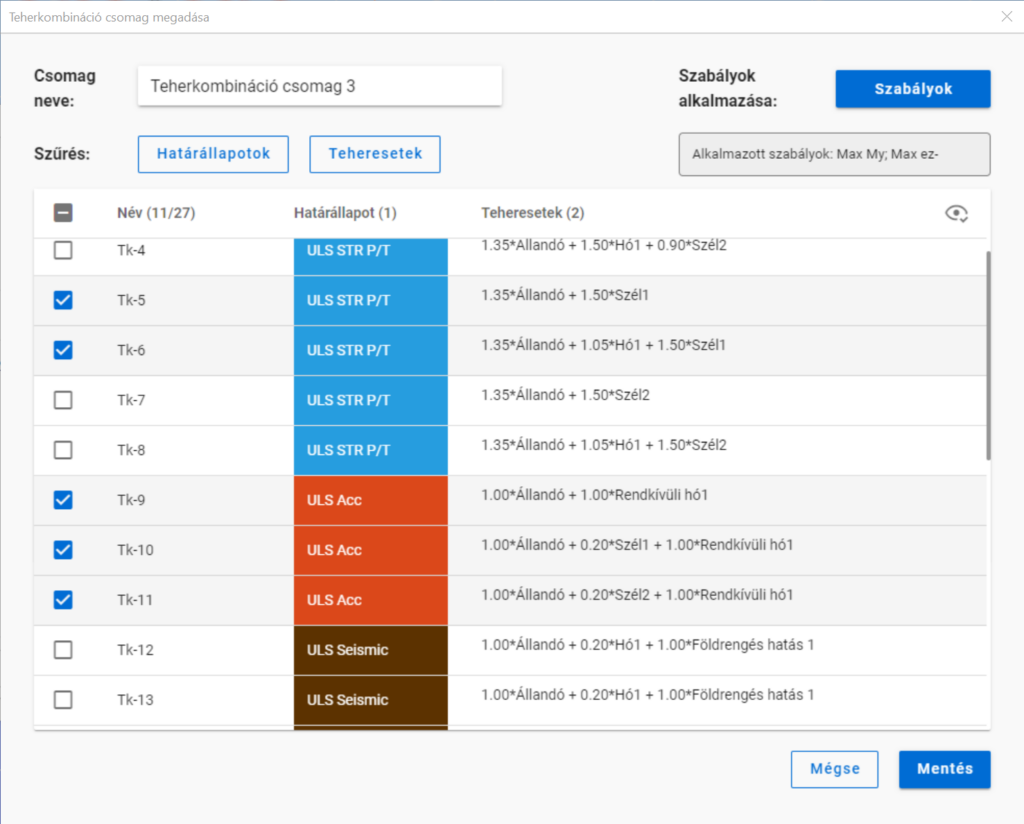
A határállapotok és teheresetek szerinti szűrést az azonos nevű gombok alatt lenyíló jelölőnégyzetekkel lehet végrehajtani.
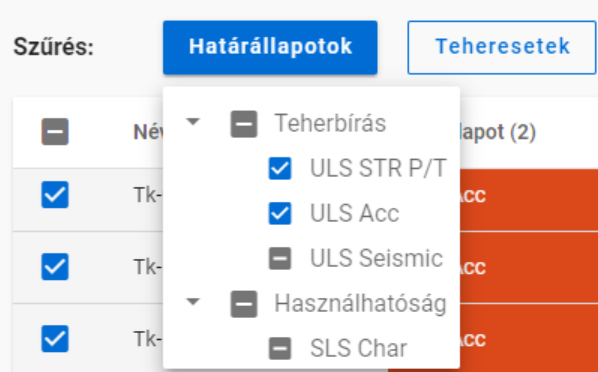
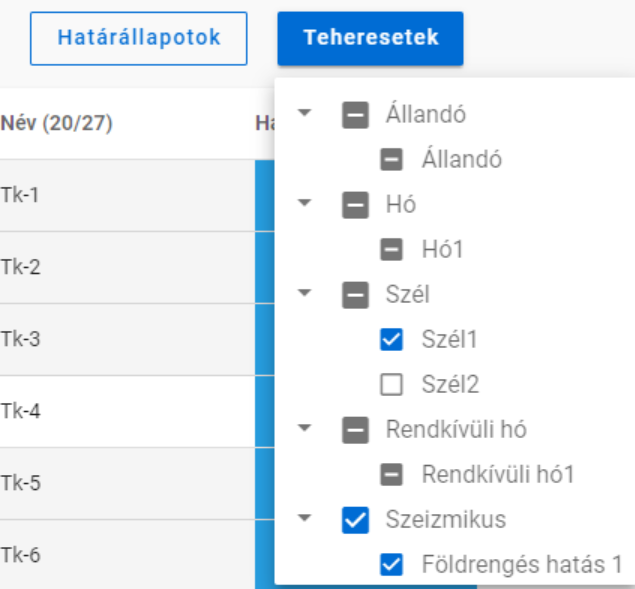
A jelölőnégyzeteknek három állása van. Nem csak kiválasztásra használhatóak, hanem egyben az adott teherkombináció csomag tartalmát is mutatják. Kézzel csak bepipált vagy üres állapotra kapcsolhatók, a köztes állás akkor jelenik meg, ha egyéb szűrőket alkalmazunk.
A határállapotok és teheresetek szerinti szűrést számítási eredmények nélkül is lehet alkalmazni.
A szabályok szerinti szűrés viszont minden esetben analízis vagy tervezési eredményeken alapszik. A különböző típusú szabályokat egyszerre vagy egymás után is lehet alkalmazni, hogy kiválasszuk a kívánt teherkombinációkat.
Amikor egy szabályt alkalmazunk, a filter megvizsgál minden teherkombinációt, ami ki volt választva a Teherkombináció csomag megadása ablakban -akár kézzel, akár határállapota vagy a benne lévő tehereset alapján-, minden olyan végeselem pontban, amit a szabály megkíván. Azok a teherkombinációk, amik megfelelnek a szabálynak, kiválasztva maradnak, míg azok, amelyek nem, nem lesznek többé kijelölve.
- Analízis szabály alkalmazásával deformációk vagy igénybevételek alapján választhatunk ki kombinációkat. Az analízis eredményeket a szabály megadásától függően minden végeselem pontban vagy csak az elemvégeken vizsgáljuk (pl. kapcsolatokhoz). Deformációkat csak SLS, míg igénybevételeket csak ULS kombinációkban vizsgálunk.
- Kihajlás szabállyal azok a teherkombinációk választhatók ki, amelyekhez tartozó rugalmas kritikus teherszorzó (első kihajlási sajátérték) kisebb a megadott értéknél.
- Kihasználtsági szabállyal a teherkombinációkat a kiválasztott részletmodell minden végeselem pontjában meghatározott kihasználtságok alapján lehet szűrni. Acél elemek esetén a kihasználtságok elérhetők minden szabványos vizsgálatból, mint pl. általános rugalmas szilárdsági ellenállás, tiszta igénybevételi ellenállás, interakciók és globális stabilitásvizsgálat. A filter csak ULS kombinációkra alkalmazható.
Különböző típusú szűrők kombinálása
A háromféle szűrőt lehetséges és érdemes együtt használni, azonban fontos tudni, hogy a szabályok szerinti szűrést csak azokon a kombinációkból válogat, amik ki vannak választva és van hozzájuk megfelelő számítási eredmény.
Vegyünk egy példát!
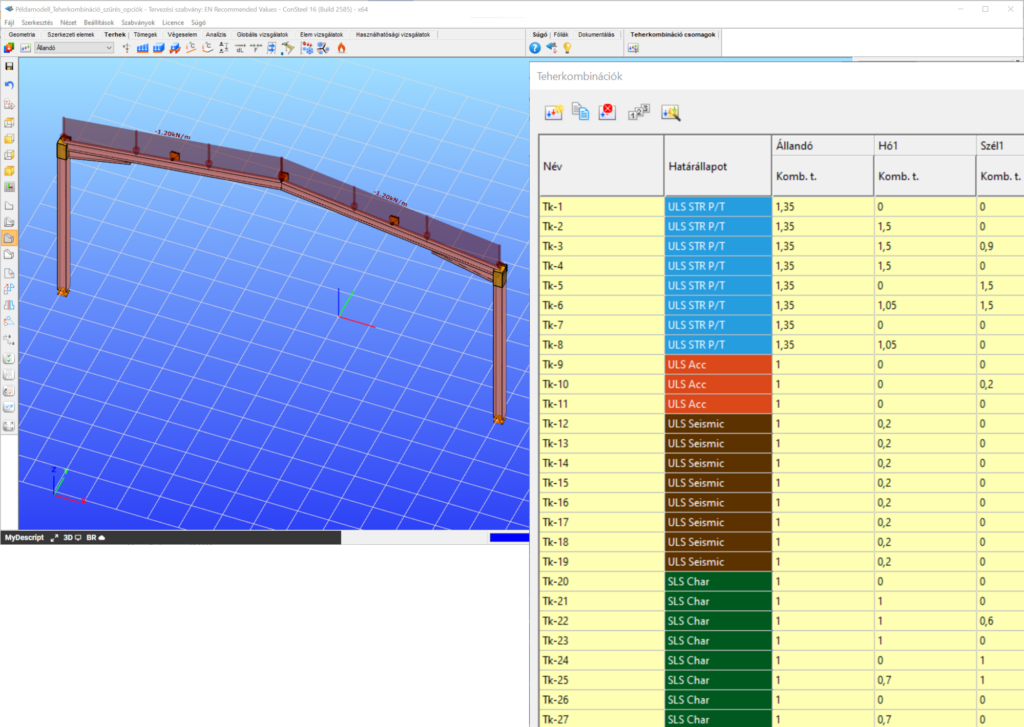
Egy egyszerű síkbeli keretmodell, amiben 27 teherkombinációt generáltunk többféle határállapotban. Az analízis és szabványos tervezési eredmények rendelkezésre állnak az összes teherkombinációban.
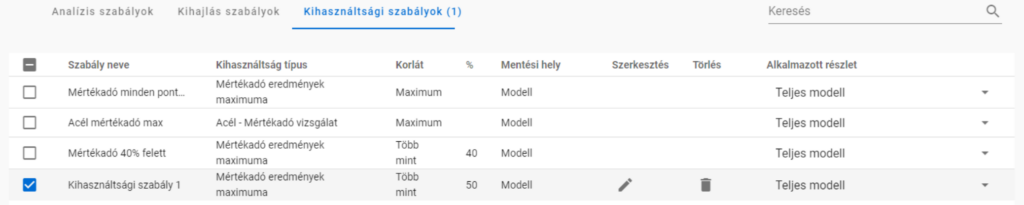
Alkalmazzunk egy kihasználtsági szabályt, amely kiválasztja azokat a teherkombinációkat, ahol a legnagyobb mértékadó kihasználtság 50% felett van.
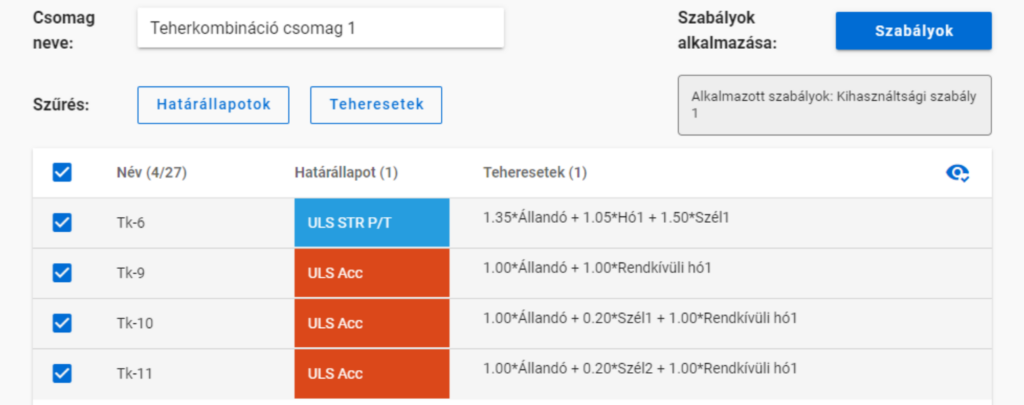
Ekkor négy teherkombinációt kapunk:
De ha az 50%-os szabály alkalmazása előtt kikapcsoljuk a rendkívüli teherkombinációkat,
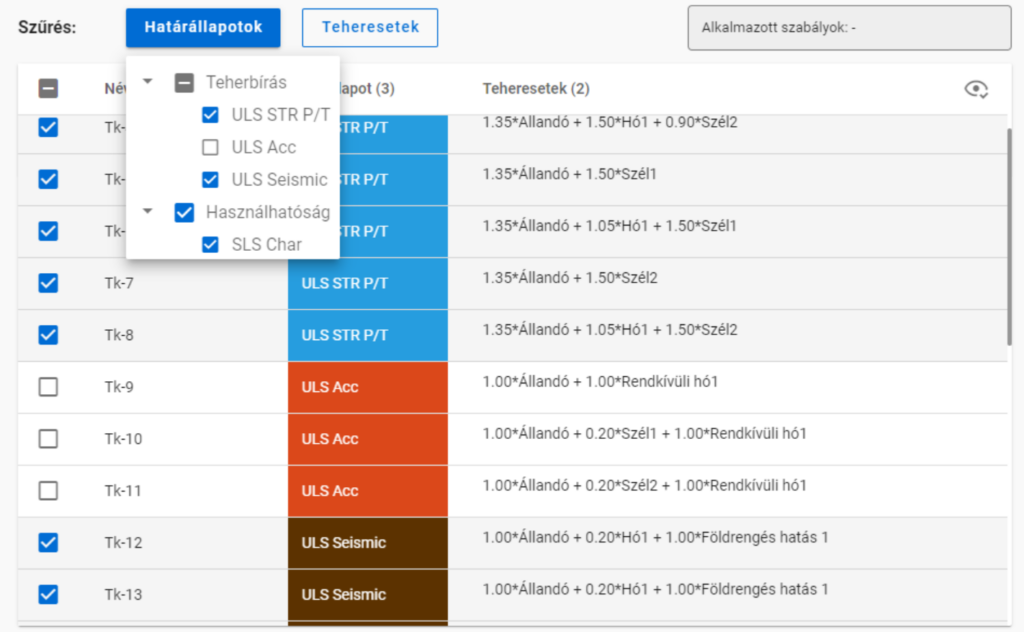
akkor a szabály alkamazása után már csak egy kombinációnk marad.
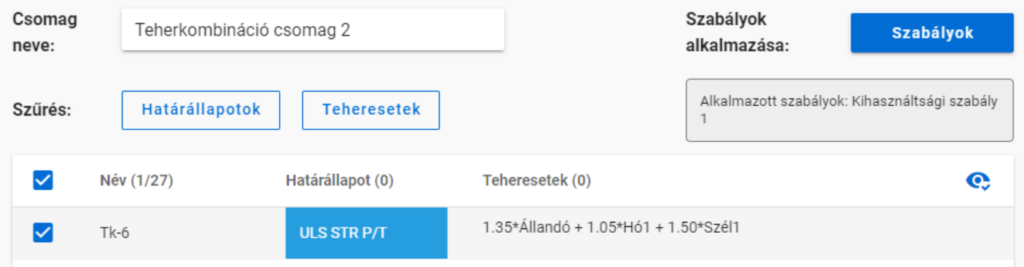
Több szabály alkalmazása
Több szabály együttes alkalmazása esetén a létrejövő teherkombináció-lista azoknak a listáknak az összege lesz, amik a szabály külön-külön való alkalmazása esetén jöttek volna létre.
gateA Consteel 16-ban bevezettük a teherkombináció szűrés funkciót. A szűrés a teherkombinációk határállapota, a hozzátartozó teheresetek vagy akár a korábbi analízis eredmények és kihasználtságok alapján is lehetséges. A cél különböző csomagok létrehozása az optimalizálási folyamat különböző lépéseire csökkentve ezzel a számítási időt, miközben biztosak lehetünk, hogy az összes releváns teherkombinációt figyelembe vettük. Lássuk, hogyan néz ki ez a tudatos munkafolyamat a gyakorlatban!
Leírás
A legtöbb szerkezettervezési projekten jelentős probléma, hogy a szabványok számos teheresetet és kombinációt definiálnak. Bár e kombinációk többsége soha nem releváns vagy mértékadó, ettől függetlenül általában nem nyilvánvaló, melyeket lehet biztonsággal elhanyagolni, különösen, ha azt is figyelembe kívánjuk venni, hogy különböző teherkombinációk lehetnek relevánsak a szerkezet különböző részeire, mint az elsődleges vagy másodlagos szerkezet, kapcsolatok stb. Ennek megfelelően az optimalizálási folyamatot nagy mennyiségű felesleges számítás terheli.
A teherkombináció szűrés funkcióval csökkentett teherkombinációs listák, vagyis teherkombináció csomagok létrehozása a cél, amelyek az optimalizálás különböző részeihez elmenthetők.
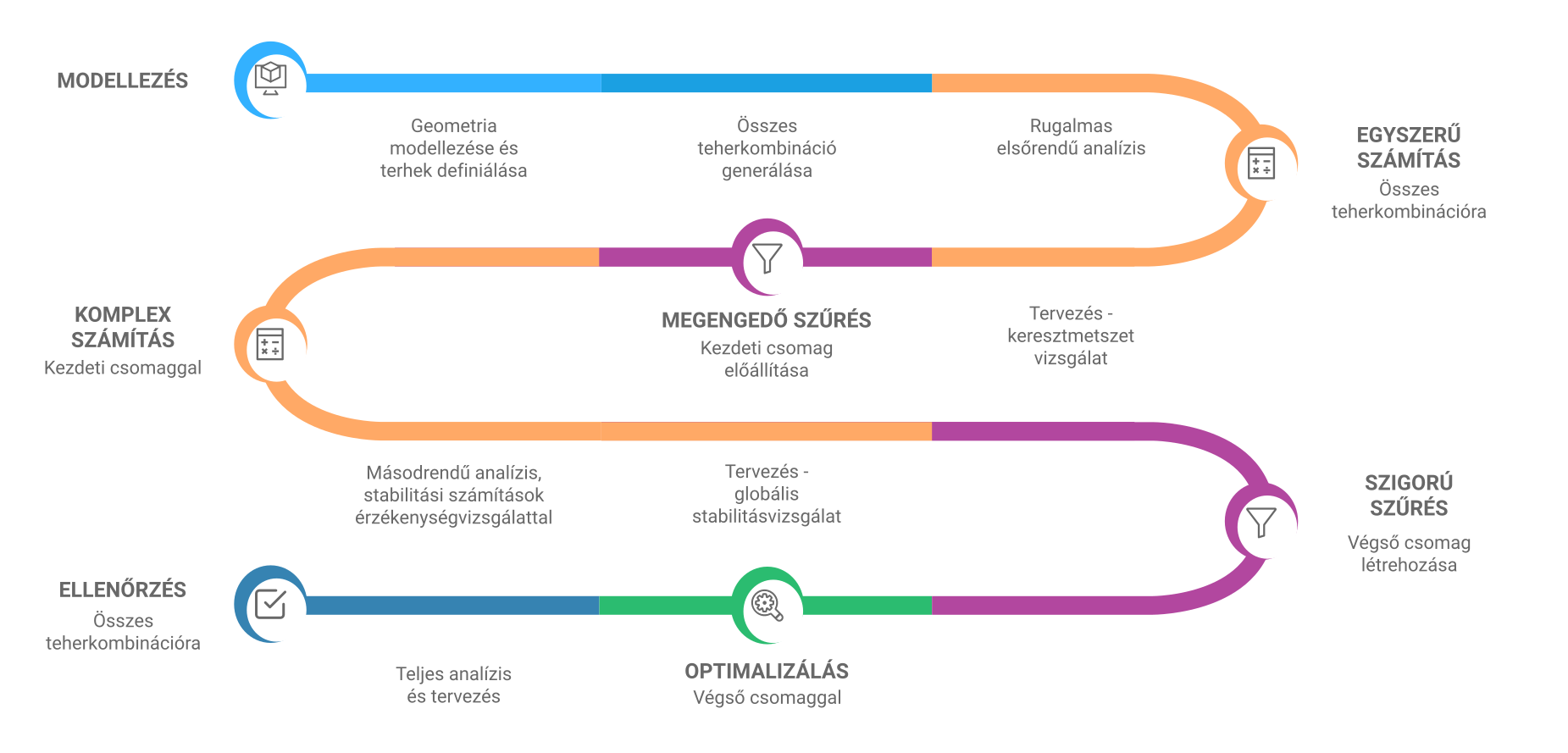
A szűrési funkció optimális munkafolyamata attól függően változhat, hogy milyen céllal hozzuk létre a csomagokat, de létezik egy ajánlott általános folyamat, ami bármelyikhez alapul szolgálhat.
Először a legegyszerűbb számításokat végezzük el és használjuk ezek eredményét egy megengedő szűréshez. Már ez jelentősen le fogja csökkenteni a teherkombinációk számát. Majd a számítások összetettségét növelve tovább tudjuk csökkenteni a kombinációs listát, immár szigorúbb szűrőket alkalmazva. Ha szükséges, ez a lépés ismételhető. Ezzel az iteratív eljárással elkerülhető az esetlegesen sok ezer kombináció időigényes számítása.
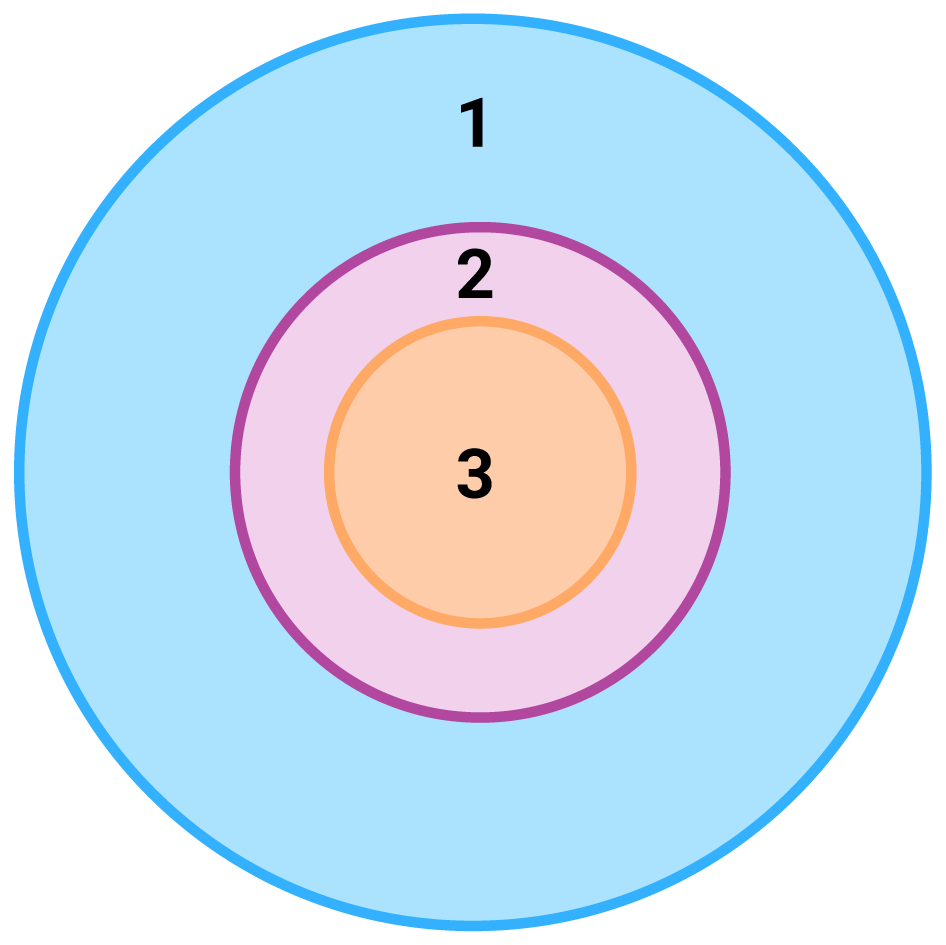
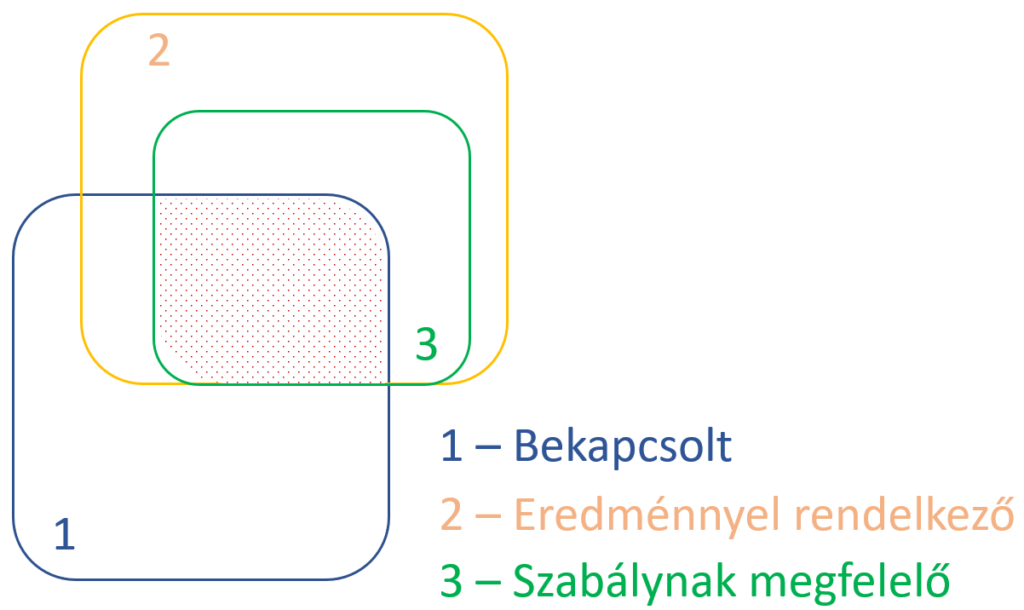
1 – összes teherkombináció, szűrés nélkül;
2 – kezdeti csomag megengedő szűréssel;
3 – végső csomag szigorú szűréssel
Részletezett folyamat
Modellezés
Minden optimalizálási folyamat alapja egy jól felépített szerkezeti modell. Ennek megfelelően a munkafolyamat első lépése a geometriai és szerkezeti modellezés és a terhek definiálása. Ajánlott ennek lezárásaként egy elsőrendű analízist futtatni egy-két teheresetre az esetleges modellezési hibák megtalálására.
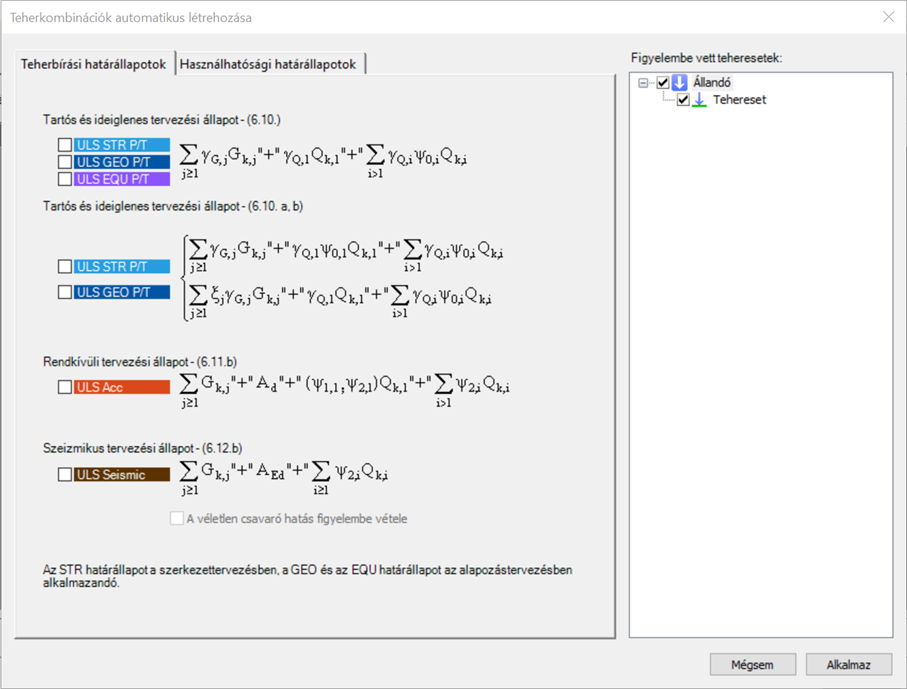
A teherkombinációkat ezután érdemes létrehozni. Mindegyik határállapotot létre kell hozni, amit a tervezés teljes ideje alatt használni szükséges. A Consteel automata teherkombináció generáló funkciója hatékony eszköz ehhez.
Számítás és szűrés
Teherkombináció csomag létrehozható a Teherkombináció csomag megadása dialógon a határállapot vagy a kívánt tehereset kiválasztásával. De általában valószínű, hogy a konkrét analízis eredményre vagy kihasználtságra történő szűrés jóval hatékonyabb tud lenni a kombinációk számnak csökkentésben. A fent leírt általános folyamat részleteiben így a következő:
gateFrom now, the new Project Center unites all the functionalities for model and account management, supplemented with easy access to personalized information and learning materials.
gateIntroduction
It is essential for the effective work of the design engineers to have a model which is easy to overview. In Consteel there are several functions to achieve that such as layers and portions, and also Member coloring by cross-section.
How it works
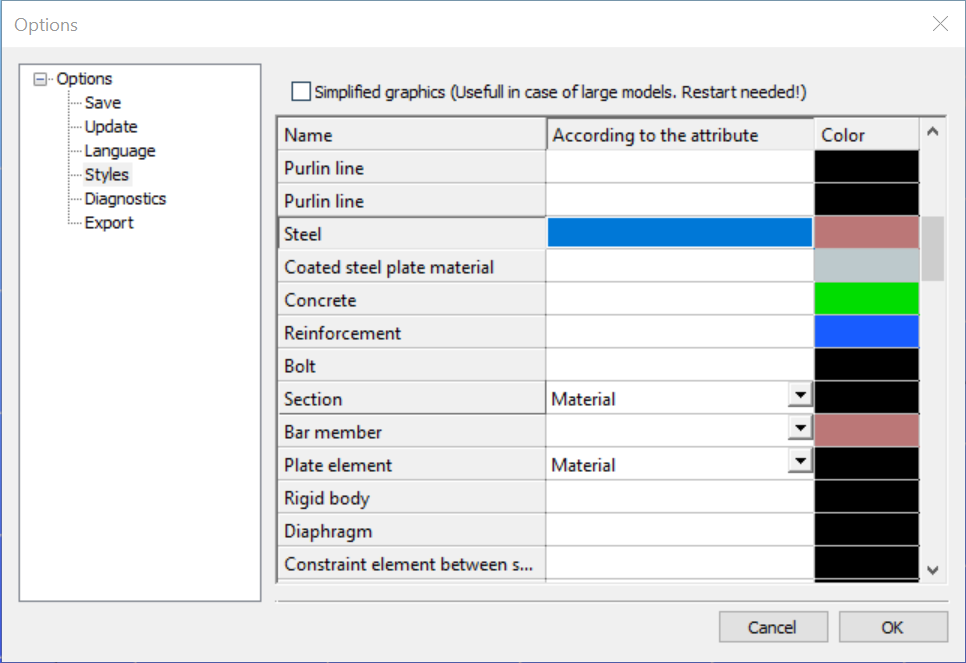
The color of the displayed objects is now determined by the object style settings in Options.
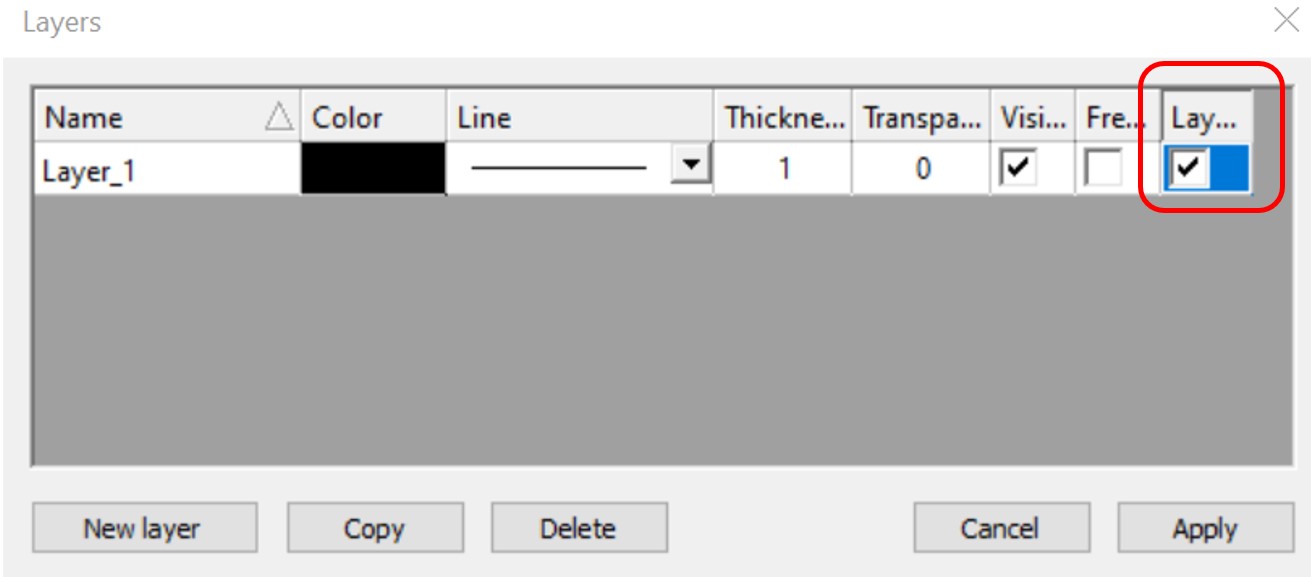
Layer color can overwrite these settings if the Layer style cell is checked on Layers dialog.
In the case of beam type members, it is also possible to set the color of the object according to the section it has defined. Coloring by member can be set with Object color setting dialog in the right bottom corner:
gateScripting is a powerful tool in your hand to create, access, and manipulate flexibly model objects and operations or calculations on them. We know it is not always easy or familiar to the structural engineers, so want to bring the power of scripting closer to you. The Consteel Programming Interfaces cover multilevel scripting options, one of them is the updated internal scripting environment, Descript.
gateModeling stiffeners in Consteel
With Superbeam feature in Consteel, modelling of stiffeners is easy and effective. Multiple options and various shapes are available. Analysis is possible with beam and shell elements either.
gateIntroduction
Are you wondering how a web opening would influence the lateral-torsional buckling resistance of your beam? Check it precisely with a Consteel Superbeam based analysis
It is often required to let services pass through the web of beams. In such cases the common solution is to provide the required number of opening in the webplate. Such an opening can have a circular or rectangular shape, depending on the amount, size and shape of pipes or ventilation or cable trays.
Beams must be designed to have the required against lateral-torsional buckling. The design procedure defined in Eurocode 3 is based on the evaluation of the critical bending moment value which provides the slenderness value, needed to calculate the reduction factor used for the design verification.
There is no analytical formula provided in the code for beams with web openings. Would the neglection of such cutouts cause a miscalculated and unsafe estimation of the critical moment value?
The following demonstration will be made with a 6 meters long simple supported floor beam with a welded section.
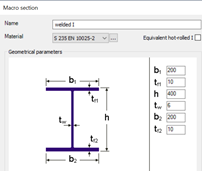
Exposed to a linear load of 10 kN/m, the critical bending moment value of the solid web beam can be obtained by performing a Linear Buckling Analysis (LBA) with Consteel.
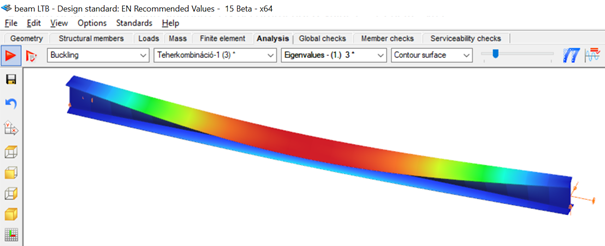
The obtained critical multiplier for the first buckling mode is 3.00 which means that the actually applied load intensity can be multiplied by 3.00 to reach the critical load level. The corresponding critical moment will have the value of Mcr = 3.0 * 47.18 = 141.54 kNm yielding a slenderness of 1.286 (Mpl,Rd = 234.20 kNm) and a lateral-torsional buckling resistance of 0.394 * 234.20 = 92.27 kNm. With this value the actual utilization ratio is at 51%.
How would this value change if a rectangular opening needs to be cut into the web of this beam?
Analytical formula for critical bending moment
By looking to the analytical formula (ENV 1993-1-1 F.4) to calculate the critical moment of double symmetric sections loaded at eccentric load application point it becomes obvious that the section properties having effect on the moment value are Iz, Iw and It.

An opening in the web has no effect on the first two values and has very little effect on the last one. As it has been already shown in previous article, the presence of such an opening can have effect on the vertical deflection, but as long as the lateral stiffness of a beam is much lower than it’s strong axis stiffness, the vertical deflections can be neglected when the lateral-torsional buckling resistance is calculated. The usual linear buckling analysis (LBA) performed also by Consteel neglects the pre-buckling deformations.
Therefore one can expect that in general web openings can be disregarded when the critical moment value is calculated.
Analysis with Consteel Superbeam
Beam finite elements cannot natively consider the presence of web openings. In order to obtain the precise analysis result, it is possible to use shell finite elements. The new Superbeam functionality comes as a solution in such cases. Instead of using beam finite elements, let’s use shell elements!
Opening can be positioned easily along the web, either as an individual opening or as a group of openings placed equidistantly. The opening can be rectangular, circular or even hexagonal. Circular openings can be completed with an additional circular ring stiffener.
The rectangular opening for this example can be easily defined with this tool. As there is no need to provide any additional opening on the remaining part of the beam, only the first part which includes the opening will be modelled with shell elements and the rest can still be modelled with beam finite elements. Using this technique, the total degrees of freedom of the model can be kept as low as possible. When using Superbeam, the designer has the choice whether to use beam or shell finite elements, as appropriate.
gateDefining cutouts with Superbeam feature in Consteel
Defining cutouts is a useful additional function within the Superbeam feature. They are easy to modify, various shapes and multi-placing option are available. Watch our feature preview for more details.
gateDual handling of members with Superbeam function in Consteel
Superbeam is a new function introduced with Consteel 15. It is developed for dual handling of members. Superbeam makes it possible to examine structural parts with the accuracy of shell elements but with the ease of using a beam element concerning definition, modification and model handling. We prepared a video to show how to convert a 7DOF beam into shell elements and how easy it is to work with it.
GateWeb openings and their deflection effect on beams
It is often required to let services pass through the web of beams. In such cases, the common solution is to provide the required number of openings in the web plate. Such an opening can have a circular or rectangular shape, depending on the amount, size and shape of pipes or ventilation or cable trays.
If the structural engineer has the freedom to position these openings along the beam, where to place them? What would be its effect on the deflection of the beam?
The effect of such openings on the deflection is more important when the length of the opening along the beam is increased. As circular openings are made with equal length and depth, they are usually less critical than rectangular openings.
The following demonstration will be made with a 6 meters long simple supported floor beam with a welded section.
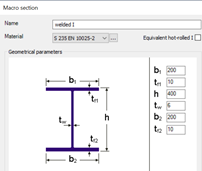
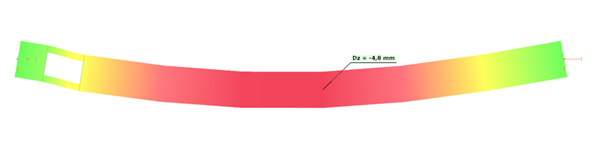
Exposed to a linear load of 10 kN/m, the deflection at mid-span of the solid web beam is 4.6 mm.
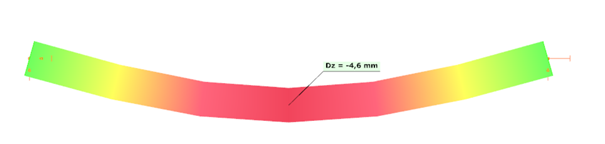
Let’s assume that a 250 mm deep rectangular opening with a length of 400 mm needs to be provided on the web, at a distance of 300 mm from the left support.
Traditional analysis with beam finite elements
Consteel 7DOF beam finite elements are very powerful, but cannot consider natively such opening. The usual approach is to build a Vierendeel-type of model, by using additional beam elements with a T shape section „above” and „below” the opening. These additional beam elements are defined eccentrically to the reference line of the solid-web beam.
Eccentricities can be easily defined in Consteel using both smart and traditional link elements.
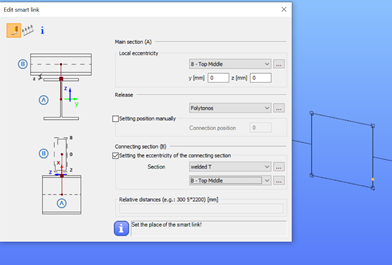
The deflection with this refined model will be equal to 4.8 mm.